warning TESLA MODEL S 2018 Workshop Manual
[x] Cancel search | Manufacturer: TESLA, Model Year: 2018, Model line: MODEL S, Model: TESLA MODEL S 2018Pages: 195, PDF Size: 5.51 MB
Page 160 of 195
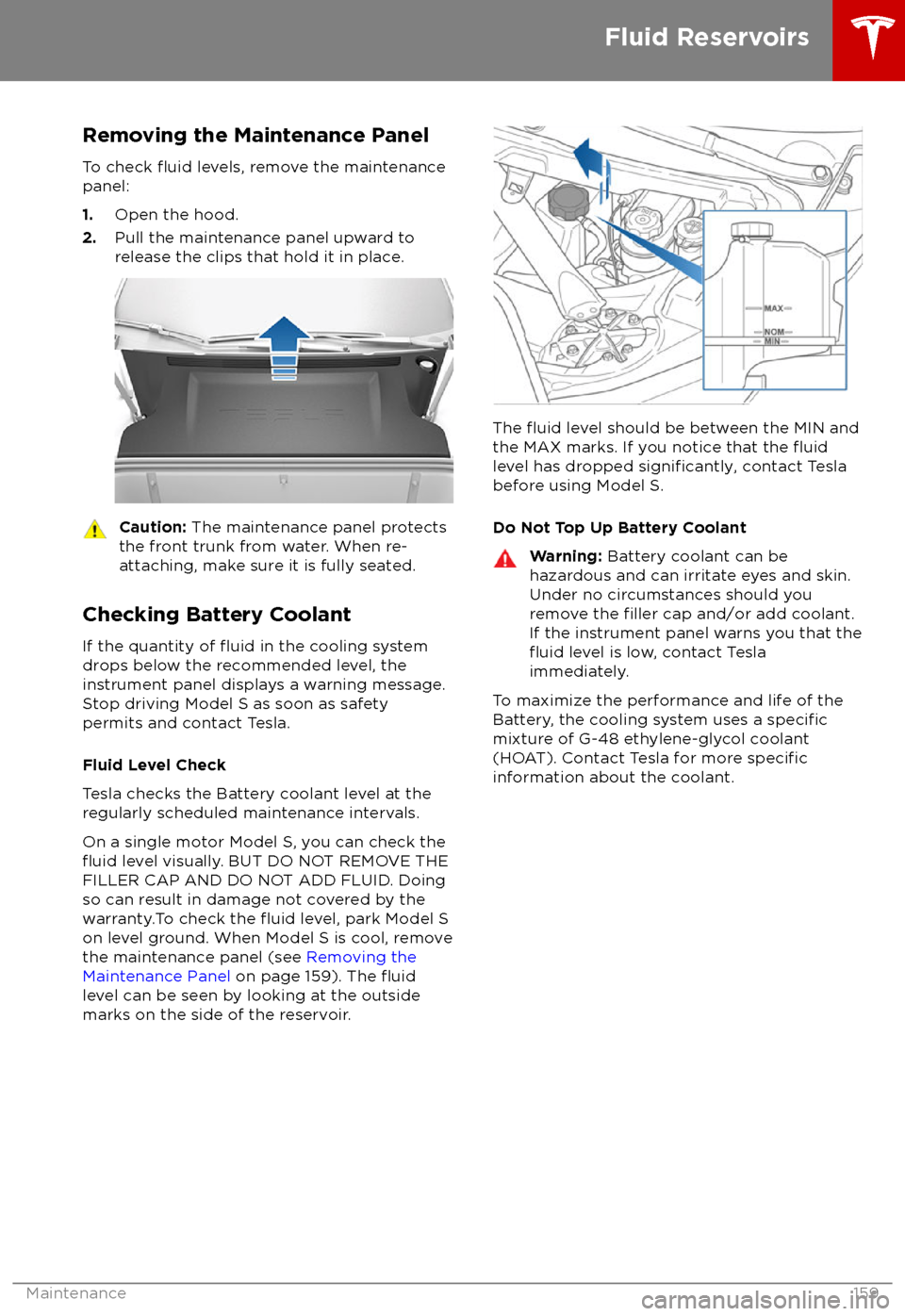
Removing the Maintenance PanelTo check
fluid levels, remove the maintenance
panel:
1. Open the hood.
2. Pull the maintenance panel upward to
release the clips that hold it in place.
Caution: The maintenance panel protects
the front trunk from water. When re-
attaching, make sure it is fully seated.
Checking Battery Coolant
If the quantity of
fluid in the cooling system
drops below the recommended level, the
instrument panel displays a warning message.
Stop driving Model S as soon as safety
permits and contact Tesla.
Fluid Level Check
Tesla checks the Battery coolant level at the
regularly scheduled maintenance intervals.
On a single motor Model S, you can check the
fluid level visually. BUT DO NOT REMOVE THE
FILLER CAP AND DO NOT ADD FLUID. Doing
so can result in damage not covered by the
warranty.To check the
fluid level, park Model S
on level ground. When Model S is cool, remove
the maintenance panel (see Removing the
Maintenance Panel on page 159). The
fluidlevel can be seen by looking at the outside
marks on the side of the reservoir.
The fluid level should be between the MIN and
the MAX marks. If you notice that the fluidlevel has dropped significantly, contact Tesla
before using Model S.
Do Not Top Up Battery Coolant
Warning: Battery coolant can be
hazardous and can irritate eyes and skin.
Under no circumstances should you
remove the
filler cap and/or add coolant.
If the instrument panel warns you that the
fluid level is low, contact Tesla
immediately.
To maximize the performance and life of the
Battery, the cooling system uses a specificmixture of G-48 ethylene-glycol coolant
(HOAT). Contact Tesla for more specificinformation about the coolant.
Fluid Reservoirs
Maintenance159
Page 161 of 195

Checking Brake FluidWarning: Contact Tesla immediately if
you notice increased movement of the brake pedal or a
significant loss of brakefluid. Driving under these conditions can
result in extended stopping distances or complete brake failure.
The Brake indicator on the
instrument panel alerts you if the
quantity of
fluid in the brake
reservoir drops below the
recommended level. If it displays
while driving, stop as soon as safety
permits by gently applying the
brakes. Do not continue driving.
Contact Tesla immediately.
Fluid Level Check
Tesla checks the brake
fluid level at the
regularly scheduled maintenance intervals. To
check it yourself, park Model S on level
ground. When Model S is cool, remove the
maintenance panel (see Removing the
Maintenance Panel on page 159).
Check the fluid level visually by looking at the
outside marks on the side of the reservoir
without removing the
filler cap.
The brake
fluid level should always be
between the MIN and the MAX marks.
Note: Although brake
fluid level drops slightly
during normal use as a result of brake pad
wear, it should not drop below the MIN mark.
Topping Up the Brake Fluid
Do not top up your brake
fluid. Tesla service
does this when you bring Model S in for
regular servicing. The following instructions
are provided for information purposes and future reference only:
1. Clean the filler cap before removing it to
prevent dirt from entering the reservoir.
2. Unscrew the cap and remove it.
3. Top up the reservoir to the MAX mark
using the appropriate brake
fluid.4. Replace the filler cap, ensuring it is fully
secured.
Warning: Only use new fluid from a
sealed air-tight container. Never use
previously used
fluid or fluid from a
previously opened container
Page 162 of 195
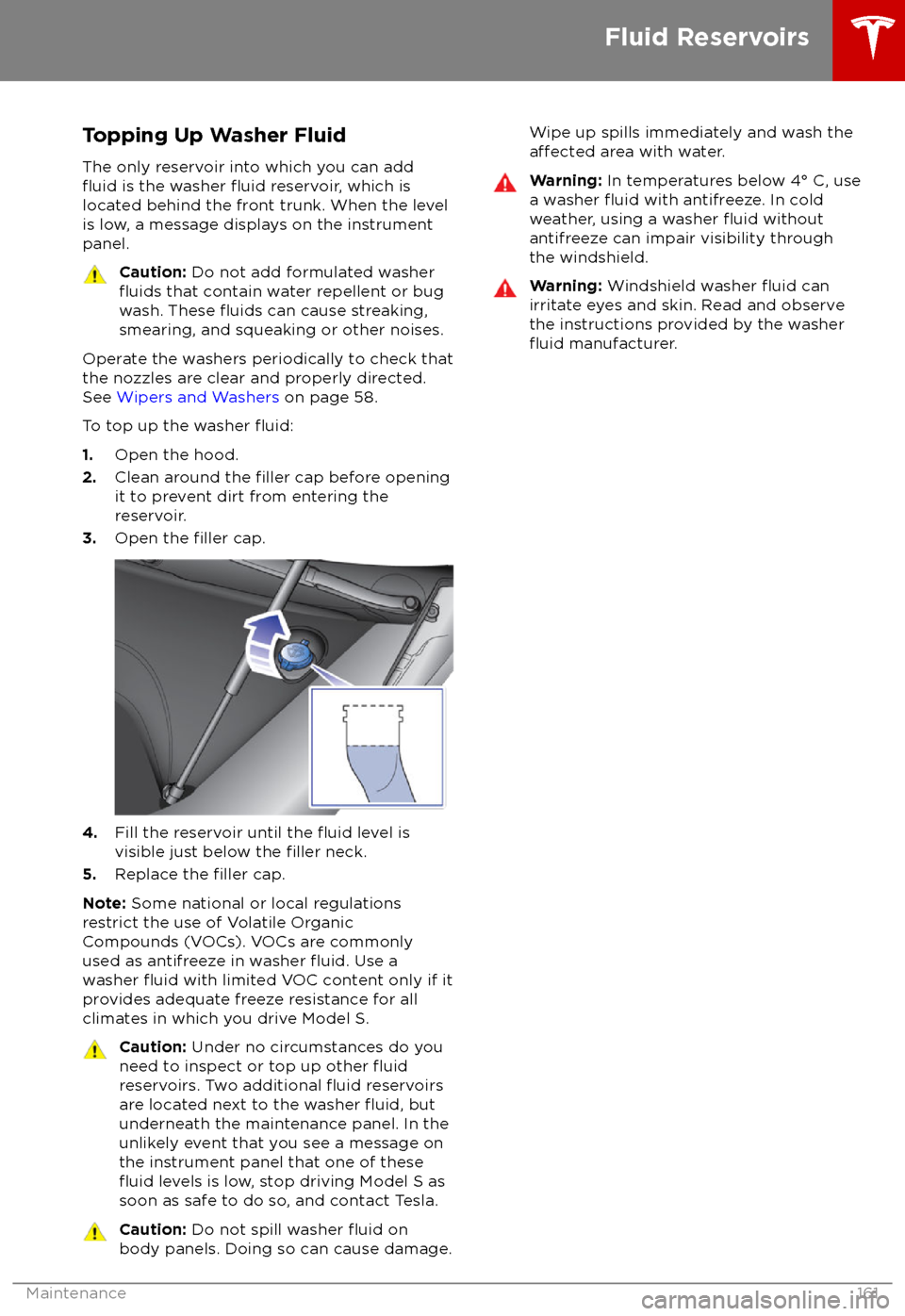
Topping Up Washer FluidThe only reservoir into which you can add
fluid is the washer fluid reservoir, which is
located behind the front trunk. When the level
is low, a message displays on the instrument panel.
Caution: Do not add formulated washerfluids that contain water repellent or bug
wash. These fluids can cause streaking,
smearing, and squeaking or other noises.
Operate the washers periodically to check that
the nozzles are clear and properly directed.
See Wipers and Washers on page 58.
To top up the washer
fluid:
1. Open the hood.
2. Clean around the filler cap before opening
it to prevent dirt from entering the reservoir.
3. Open the
filler cap.
4.Fill the reservoir until the fluid level is
visible just below the filler neck.
5. Replace the filler cap.
Note: Some national or local regulations
restrict the use of Volatile Organic
Compounds (VOCs). VOCs are commonly
used as antifreeze in washer
fluid. Use a
washer fluid with limited VOC content only if it
provides adequate freeze resistance for all climates in which you drive Model S.
Caution: Under no circumstances do you
need to inspect or top up other fluidreservoirs. Two additional fluid reservoirs
are located next to the washer fluid, but
underneath the maintenance panel. In the
unlikely event that you see a message on the instrument panel that one of these
fluid levels is low, stop driving Model S as
soon as safe to do so, and contact Tesla.
Caution: Do not spill washer fluid on
body panels. Doing so can cause damage.Wipe up spills immediately and wash theaffected area with water.Warning: In temperatures below 4
Page 164 of 195
Parts, Accessories, and
Modifications
Use only genuine Tesla parts and accessories.
Tesla performs rigorous testing on parts to
ensure their suitability, safety, and reliability.
Purchase these parts from Tesla, where they
are professionally installed and where you can
receive expert advice about
modifications to
Model S. Accessories are available for
purchase from Tesla stores or online at
www.tesla.com/shop .
Tesla is unable to assess parts manufactured
by other distributors and therefore accepts no
responsibility if you use non-Tesla parts onModel S.
Warning: Installing non-approved parts
and accessories, or performing non- approved
modifications, can affect the
performance of Model S and the safety of
its occupants. Any damage caused by
using or installing non-approved parts, or by performing non-approved
modifications, is not covered by the
warranty.
Warning: Tesla does not accept liability
for death, personal injury or damage that
occurs if you use or install non-approved
accessories or make non-approved
modifications.
Body Repairs
If Model S is in a collision, contact Tesla to
ensure that it is repaired with genuine Tesla
parts. Tesla has selected and approved body
shops that meet strict requirements for
training, equipment, quality, and customer satisfaction.
Some repair shops and insurance companies
might suggest using non-original equipment
or salvaged parts to save money. However,
these parts do not meet Tesla
Page 166 of 195

Load Capacity Labeling
It is important to understand how much weight your Model S can safely carry. Thisweight is called the vehicle capacity weight
and includes the weight of all occupants, cargo and any additional equipment added toyour Model S since it was manufactured.
Two labels attached to the center door pillar
indicate how much weight Model S can safely
carry. Labels are visible when the front door is
open.
1. Tire and Loading Information Label
2. Statutory Plate
Warning: Overloading Model S has an
adverse effect on braking and handling,
which can compromise your safety or cause damage.Caution: Never load more than 136 kg in
the front trunk. Doing so can cause
damage.Caution: Never load more than 175 lbs
(80 kg) on the rear load floor (above the
lower trunk compartment) or more than
130 lbs (60 kg) in the lower trunk
compartment. Doing so can cause
damage.Caution: Never store large amounts of
liquid in Model S. A significant spill can
cause electrical components to
malfunction.Tire and Loading Information Label
The Tire and Loading Information label
provides:
Page 180 of 195

When Transporting Model SAlways transport Model S with all four tires
offthe ground. A flatbed truck or comparable
transport vehicle is recommended. A wheel lift
and dolly can be used only when transporting
Model S for a maximum of 15 miles (25 km), provided the driving speed does not exceed45 mph (70 km/h). When transporting,
whether on a
flatbed truck or using a wheel
lift and dolly, Model S can face either direction.
Do not transport Model S using any other method unless
specified by Tesla. Follow the
steps provided and observe all warnings and
cautions. Damage caused by transporting your
vehicle is not covered by the warranty.
Note: The following illustrations are for
demonstration purposes only.
Warning: Model S is equipped with high
voltage components (see High Voltage
Components on page 138). Before
transporting Model S as a result of an
event (such as a collision) that may have
compromised a high voltage component, it is important to assume that these
components are energized. Always follow
high voltage safety precautions (wearing
personal protective equipment, etc.) until
emergency response professionals have
evaluated the vehicle and can accurately
confirm that all high voltage systems are
no longer energized. Failure to do so may
result in serious injury or death.
Disable Self-Leveling (air
suspension vehicles only)
If Model S is equipped with Smart Air
Suspension, it automatically self-levels, even
when power is
off. To prevent damage, you
must activate Jack mode to disable self- leveling:
1. Touch Controls > Suspension on the
touchscreen.
2. Press the brake pedal, then touch Very
High to maximize height.
3. Touch Jack.
Note:
Jack mode cancels when Model S is
driven over 4 mph (7 km/h).Warning: Failure to activate Jack mode
on a Model S equipped with Smart Air
Suspension can result in the vehicle
becoming loose during transport, which
may cause
significant damage.
Activate Tow Mode
Model S may automatically shift into Park
when it detects the driver leaving the vehicle,
even if it has previously been shifted into
Neutral. To keep Model S in Neutral (which
disengages the parking brake), you must use
the touchscreen to activate Tow mode:
1. Shift into Park.
2. Chock the tires or otherwise ensure
Model S is stable.
3. Press and hold the brake pedal, then on
the touchscreen touch Controls >
Settings > Service & Reset > Tow Mode >
ON .
When Tow mode is active, Model S
displays this indicator light on the
instrument panel, along with a
message telling you that Model S is
free-rolling.
To cancel Tow Mode, shift Model S into Park.
Caution: If the electrical system is not
working, and you therefore cannot release
the electric parking brake, attempt to
jump start the 12V battery. For
instructions, call Tesla Roadside
Assistance. If a situation occurs where
you cannot disengage the parking brake,
use a self-loading dolly or tire skates.
Before doing so, always check the
manufacturer
Page 189 of 195

AABS (Anti-lock Braking System) 60
absolute speed limit 97
Acceleration (dual-motor) 104
Acceleration settings 67
access panel, removing 159accessoriesplugging into power socket 122
adaptive headlights 56
air circulation 112
air conditioning 111
air distribution 112
air
filter 115
air suspension 118
air vents 115
airbag, front passenger, disabling 37
airbags 35
alarm 132
all-season tires 151
always connected, setting 70
anti-lock braking (ABS) 60
audioplaying files 119
steering wheel buttons 41
volume control 119
Auto High Beam 56
Auto Lane Change 85
auto-raising suspension 117
automatic emergency braking 94
Autopark 87
Autopilot components 73
Autosteer 82
average range 70
B backup camera 72
battery (12V)complete discharge 140specifications 170Battery (high voltage)care of 140
coolant 159
specifications 170
temperature limits 140
battery (key), replacing 5
blind spot warning 91
Bluetoothdevices, playing audio files from 122
general information 124
phone, pairing and using 124
body repairs 163
body touch up 156
brake
fluid replacement 147
brakesautomatic in emergencies 94fluid level 160brakes (continued)overview of 60specifications 170
brightness of displays 107
C
Cabin Overheat Protection setting 107
cabin temperature control 111
Calendar app 131
camera (rear view) 72
cameras (autopilot) 73
car cover 156
car status, displaying 41, 42
car washes 154
cargo area 11
cargo volume 168
carpets, cleaning 155
CE
certifications 185
CHAdeMO 139
chains 151
change of ownership 110
charge port 142
charge port light 143
chargingcharge settings 144
components and equipment 138
instructions 142
public charging stations 139
scheduling 144
status of 145
charging locations, finding 127
child protectiondisabling liftgate and rear door handles 7
disabling rear window switches 9child seatscleaning 155
disabling front passenger airbag 37
installing and using 24
Tesla built-in rear facing 31
Chill acceleration 67
cleaning 154
climate controls 111
Climate Timer 114
Cold Weather controls 104
collision avoidance assist 93
console12V power socket 122
cup holders 17
USB ports 122
consumption chart 70
contact informationroadside assistance 177coolantBattery, checking level of 159
Battery, replacement interval 147
copyrights 182
Creep 104
Index
188Model S Owner
Page 190 of 195
cruise control 76
cup holders 17
D
DAB radio 120
dashboard overview 2
data recording 183
data sharing 183
day mode 107
declarations of conformity 185
delivery mileage 183devicesBluetooth, playing audio files 122
connecting 122
playing audio
files from 122
dimensions 167
display brightness 107
dome (map) lights 53
door handles 6
door labels 165
Door Unlock Mode 6
doors 4
doors, opening 4
Drive gear 46
drive-away locking 7
driverprofiles 39
seat adjustment 18driver assistanceAuto Lane Change 85
automatic emergency braking 93
Autopark 87
Autosteer 82
blind spot warning 91
collision avoidance assist 93
forward collision warning 93
overtake acceleration 76
overview 73
settings for 107
side collision warning 91
speed assist 97
speed limit warning 97
staying inside lane markings 91
staying within speed limits 97
Traffic-Aware Cruise Control 76
drivingseating position 18
starting 45
tips to maximize range 70
E
Easter Eggs 181
easy entry, driver
profile 39
EDR (event data recorder) 183
electric parking brake 61
emergency braking
93
emergency flashers 57
emergency rear door opening 8energygained from regenerative braking 60
range information 47
energy & charging setting 107
Energy app 70
energy saving mode 70
Erase & Reset 110
event data recording 183
exteriorcar cover 156
cleaning 154
dimensions 167
lights 53
overview 3
polishing, touch up, & repair 156
F
factory defaults, restoring 110
factory reset 110
fan speed, interior 112
favorite destinations 129
Favorites 126
Favorites (Media Player) 121
FCC
certifications 185
features, downloading new 136
ferries, avoiding 128
firmware (software) updates 136flash drives, playing audio files from 122flashers, warning 57floor mats 156
fluidsreplacement intervals 147
reservoirs, checking 159
fog lights 53
forward collision warning 93
front passenger detection 37
front trunk 13
G
garage doors, opening 133
gates, opening 133
GAWR 165
gears 46
glove box 15
Gross Axle Weight Rating 165
Gross Vehicle Weight Rating 165
ground clearance 167
GVWR 165
Index
Index189
Page 191 of 195
H
hazard warning
flashers 57
head restraints 19
head supports 19
headlightsadaptive 56
after exit 56
high beams 56
heated wipers 58
heating 111
height adjustments (suspension)auto-raising 117
automatic and manual settings 118
disabling (Jack mode) 118
high beam headlights 56
high voltageBattery specifications 170
components 138
safety 147
hills, stopping on 66
hitches 166
Home location 129
HomeLinkFCC certification 186
programming and using 133
hood 13
horn 43
I
IC
certifications 185identification labels 164
Insane acceleration (performance dual motor) 67
Insane setting (dual-motor) 104
instant range 70
instrument panelcharging status 145
cleaning 155
overview of 47interiorcleaning 155
dimensions 167
lights 53
overview 2
temperature control 111
Internet radio 121
intrusion detection 132
ISOFIX child seats, installing 27
J
J1772 139
Jack mode 118
jacking 162
KkeyFCC and IC certifications 185
how to use 4
key not inside 45
ordering extras 5
replacing battery 5
keyless entry 4
L
labelStatutory Plate 165
Tire and Loading Information 165
lane assist 91
lane change flash 57
lane change, automatic 85
lane departure warning 91
Language & Units 107
language setting 107
Launch Mode (performance dual motor) 67
liftgateadjust opening height 10
opening 10
lifting 162
lightsadaptive headlights 56
hazard warning 57
headlights after exit 56
turn signals 56
load limits 165
location-based suspension 117
locking and unlocking doors 4
Ludicrous acceleration (performance dual
motor) 67
Ludicrous setting (dual-motor) 104
lumbar support 18
M
maintenancebrake fluid, checking 160
cleaning 154
daily and monthly checks 147
fluid replacement intervals 147
panel, removing 159
replacing wiper blades 157
service intervals 147
tires 148
washer
fluid, topping up 161
washer jets, cleaning 157
map updates 130
maps 126
mats 156
Max Battery Power 104
Index
190Model S Owner
Page 192 of 195
Max Battery Power (performance dual motor)67
media 119
mileage upon delivery 183
mirrors 44
mobile app 137Mobile Connectordescription 139
using 142
modifications 163
motor torque, reduced 95
my car does what? 181
N
naming 110
navigation 126
NCC
certifications 185
Neutral gear 46
night mode 107
O odometer 69
offset from speed limit 97
overhang dimensions 167
overtake acceleration 76
Owner Information, about 182
P Park Assist 64
Park gear 46
parking brake 61
parking, automatic 87
parts replacement 163
Passive Entry 107
Pedal Misapplication Mitigation 93
personal data, erasing 110
phonesteering wheel buttons 42
using 124
PIN 40
power management 70
power socket 122
power windows 9
powering on and
off 45
Preconditioning 107
preferences, setting 107
public charging stations 139
R
radar 73
radio 119
Radio Frequency information
185rangedisplayed on instrument panel 47
driving tips to maximize 70
regenerative braking 60
range assurance 70
Range mode 70
Range Mode 104
Rated range 107
re-routing 128
rear seats, folding and raising 19
rear view camera 72
rear window switches, disabling 9
Recent (Media Player) 121
Recents 126
regenerative braking 60
region format 107
relative speed limit 97
release notes 136
restarting the touchscreen 45
Reverse gear 46
RFID transponders 163
roadside assistance 177
roof racks 166
rotating tires 149
route overview 128
S
safety informationairbags 37
child seats 29
rear facing child seats 34
seat belts 22seat beltscleaning 155
in a collision 22
overview of 21
pre-tensioners 22
wearing when pregnant 21
seat covers 20
seat heaters 111
seating capacity 165
seatsadjusting 18
heaters 111
Tesla built-in rear facing 31
security settings 132
sensors 73
service data recording 183
service intervals 147
Settings 107
Settings, erasing 110
shifting gears 46
Show Commute Advice 128
side collision warning 91
slip start 63
Smart Preconditioning 107
Index
Index191